If you are looking for the best TV for NASCAR streaming, don’t choose a television based on resolution alone. Fast motion handling, screen brightness, reflections, viewing angle, app support, Wi-Fi stability, and easy control matter more during a three-hour race than a long list of marketing features.
That matters even more in 2026 because NASCAR viewing is spread across multiple platforms. NASCAR’s official viewing guides show Cup Series coverage across FOX Sports, NBC Sports/USA, Amazon Prime Video, and TNT Sports. Prime Video carries five Cup Series races in 2026, while TNT Sports also carries five mid-season Cup races. Meanwhile, Nielsen reported that streaming represented 48.5% of U.S. TV watch time in June 2026.
For many fans, the best TV for NASCAR streaming isn’t simply the one with the sharpest demo reel; it is the one that handles racing motion well and makes switching between apps and services painless.
A smartphone can complete that setup. With the right TV and a compatible phone app, you can search for races, change volume, switch inputs, launch streaming apps, and recover quickly when the physical remote disappears.
1. What Makes the Best TV for NASCAR Streaming?
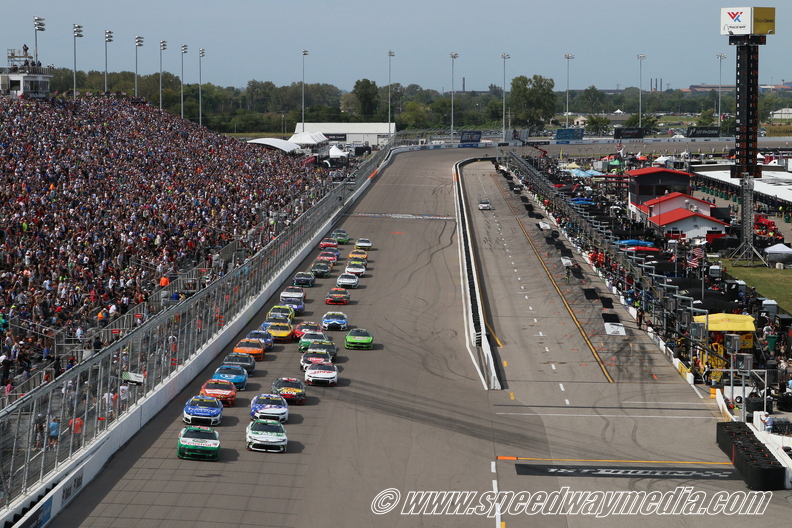
The best TV for NASCAR streaming should make a fast-moving race look clean, bright, and easy to follow. NASCAR is visually demanding because the picture constantly combines moving cars, fences, track textures, camera pans, sponsor graphics, timing towers, and rapidly changing shots.
Start with five priorities:
- A native 120Hz-class panel or better for strong motion performance
- Good image processing for lower-bitrate or compressed streams
- Enough brightness and reflection control for daytime races
- Wide viewing angles if friends watch from different seats
- A smart TV platform that supports the services you use
A 4K panel is still a sensible baseline for a new television, but 4K resolution alone doesn’t guarantee a better race.
A cheaper 60Hz set with weak motion processing may look less convincing during a high-speed camera pan than a stronger 120Hz model. This is especially noticeable when the camera follows a pack of cars through a corner and the background rushes across the screen.
That is why our definition of the best TV for NASCAR streaming starts with motion and usability, not resolution alone.
In practical terms, the best TV for NASCAR streaming should preserve car detail during pans without making the broadcast look unnaturally smooth.
For example, imagine watching the Daytona 500 on two 65-inch TVs. Both are 4K. One uses a basic 60Hz panel while the other has stronger 120Hz motion handling. During static interviews, they may look similarly sharp. Once the field reaches racing speed, differences in motion clarity can become much more obvious.
2. Why Motion Handling Matters More Than a “4K” Sticker
Race cars can cross the frame in a fraction of a second. If the television has slow pixel response, poor motion processing, or aggressive smoothing, the image can look blurry, smeared, or unnaturally processed.
For NASCAR, you want a TV that keeps numbers, sponsor logos, and car edges reasonably clear as the camera follows the field.
A native 120Hz panel is a strong target even when the stream itself is delivered at a lower frame rate.
The extra panel capability gives the TV more flexibility for motion processing and makes it more useful for gaming and other high-frame-rate content.
For example, LG lists the 2026 OLED evo C6 with a 120Hz native panel and VRR support up to 165Hz. Samsung’s 2026 S95H OLED includes high-refresh Motion Xcelerator features, while TCL lists the QM8K with a native 144Hz panel.
Those specs don’t automatically make one model the best TV for NASCAR streaming, but they are relevant indicators for fast sports.
Do not simply turn every motion setting to maximum.
Excessive interpolation can create artifacts around cars, safety fences, wheels, and on-screen graphics. Start with a Sports or Standard preset, then increase motion smoothing only enough to improve clarity without making the broadcast look artificial.
This is where testing matters. Watch a camera pan across the grandstands or follow a car through a high-speed turn. If details remain reasonably clean without strange halos, you are moving in the right direction.
3. Choose the Right Screen Size for Your NASCAR Setup
A large screen makes racing easier to follow because you can see more detail in the pack, timing graphics, and trackside action.
But the best TV for NASCAR streaming is not automatically the largest model that fits through the door.
Think about seating distance and room layout.
For a typical living room, 65 inches is a strong all-around size. If you sit farther away or regularly host race-day groups, 75 to 85 inches can create a much more immersive experience.
In a smaller room, 55 inches may still be ideal because you can easily scan the entire screen.
Consider this practical example:
| Screen size | Good use case |
| 55 inch | Small room or closer seating |
| 65 inch | Balanced living-room option |
| 75 inch | Group viewing and larger rooms |
| 83–85 inch | Premium race-day setup |
The important point is visibility.
The best TV for NASCAR streaming should let you read position graphics and identify cars without forcing you to lean forward.
For race-day groups, the best TV for NASCAR streaming also needs enough size and off-axis consistency for people sitting away from the center seat.
Imagine six people watching Talladega from a wide sectional sofa. A display that looks fantastic only from the center seat may be less useful than one that maintains good color and contrast farther to the side.
That is why viewing angle belongs on your checklist alongside refresh rate and brightness.
4. Bright-Room Performance Can Make or Break a Daytime Race
Many NASCAR events happen during the day, so your TV may compete with windows, lamps, and room reflections.
That makes brightness and anti-reflection performance especially important.
OLED TVs offer excellent black levels and very fast pixel response, but a bright room can still favor a television with strong reflection handling.
Mini-LED TVs can also be attractive for daylight viewing because they can deliver high brightness across large areas of the image.
Samsung’s S95H is a useful example because Samsung lists Glare Free anti-reflection technology and an Ultra Viewing Angle on the model.
That combination matters in a room where several people watch from different seats.
TCL’s QM8K uses a QD-Mini LED backlight, a 144Hz native panel, and emphasizes strong brightness performance.
LG’s C6 combines OLED response with its current Brightness Booster processing and OLED Motion features.
For a dark media room, OLED contrast may be the priority. For a sunny living room, the best TV for NASCAR streaming may be the model that controls reflections better, even if another television wins in a dark showroom.
That bright-room advantage can matter more than absolute black level when choosing the best TV for NASCAR streaming for afternoon races.
Before buying, look at your room at the actual time races are normally on.
If a window reflects directly into the screen at 2 p.m., that real-world condition should influence your decision more than a specification sheet.
5. Three Strong TV Types to Consider in 2026
No single TV is best for NASCAR streaming in every room and budget, but three current models show what to prioritize.
| TV | Why it suits NASCAR | Smart advantage | Best for |
| LG OLED evo C6 | 120Hz native OLED, fast response, strong contrast | webOS 26, ThinQ, AirPlay, Google Cast | Balanced premium setup |
| Samsung OLED S95H | Glare-free screen, wide viewing angle, strong motion features | Tizen, SmartThings, Google Cast | Bright rooms and groups |
| TCL QM8K | Native 144Hz QD-Mini LED panel | Google TV, Chromecast, AirPlay 2 | Large-screen value |
LG OLED evo C6: balanced premium choice
LG’s 2026 C6 is a compelling candidate for the best TV for NASCAR streaming because it combines OLED pixel response with a 120Hz native refresh rate, modern video processing, Wi-Fi 6, and current streaming features.
LG also lists Google Cast, Apple AirPlay, webOS 26, and LG ThinQ phone-remote support.
This combination makes sense for viewers who want NASCAR, movies, console gaming, and general streaming from the same display.
Samsung S95H: strong for reflections and side seating
The S95H stands out when daytime glare is a major problem.
Samsung lists Glare Free anti-reflection, an Ultra Viewing Angle, OLED HDR processing, and advanced motion features. It also includes SmartThings functionality and mobile-to-TV features.
If your race-day gathering includes several seats across a wide room, those features matter most.
TCL QM8K: large-screen, high-refresh alternative
TCL’s QM8K uses Google TV, a native 144Hz panel, and QD-Mini LED technology.
It also supports Chromecast, AirPlay 2, and Wi-Fi 6 on major sizes, giving it a strong smart-platform foundation.
These are examples, not the only good choices.
The best TV for NASCAR streaming is ultimately the model that fits your room, preferred apps, and budget.
A useful shortlist should therefore compare best TV for NASCAR streaming candidates by room conditions as well as panel technology.
6. Check NASCAR Streaming Apps Before You Buy the TV
App compatibility matters more in 2026 because NASCAR Cup Series coverage is split among several rights holders.
NASCAR’s official 2026 guides show early-season coverage on FOX and FS1, five Cup Series races on Prime Video, five mid-season Cup races on TNT Sports, and late-season coverage across NBC and USA.
For Prime Video specifically, NASCAR lists five 2026 Cup Series races: Charlotte, Nashville, Michigan, Pocono, and Naval Base Coronado.
TNT Sports similarly carries five mid-season Cup Series races, with streaming availability through HBO Max’s sports offering.
That fragmentation changes how you should evaluate the best TV for NASCAR streaming.
Before buying, verify whether the TV platform supports the services you actually use.
| Viewing need | What to verify |
| FOX / FS1 | Live-TV provider or supported streaming app |
| Prime Video | Current Prime Video app |
| TNT Sports | TV provider and Max availability |
| NBC / USA | Peacock and live-TV setup |
| NASCAR extra content | Supported FAST and streaming services |
NASCAR’s September 2026 viewing guide also lists the NASCAR 24/7 channel on Prime Video, Roku, Samsung TV Plus, Tubi, and Xumo.
A fast processor and a good smart-TV platform therefore contribute directly to the best TV experience for NASCAR streaming.
If the interface is slow or a required app is unavailable, excellent panel quality will not fix the inconvenience.
In 2026, app coverage matters in the best TV for NASCAR streaming decision because a season can move between several services.
7. Turn Your Smartphone Into the Race-Day Remote
Once you have the best TV for NASCAR streaming for your room, your smartphone can become the control center.
For an iPhone household, a compatible remote control app for ios can be useful when the television supports network control.
LG, Samsung, Google TV, Roku, and other ecosystems offer different ways to interact with your phone.
The smartphone’s biggest advantage is text entry.
Suppose you want to search:
NASCAR Cup Series Michigan
Typing that phrase with a phone keyboard can be much quicker than moving across an on-screen keyboard one letter at a time.
A good remote TV app also helps you change volume, navigate menus, and launch apps when the original physical remote is across the room.
Your phone is especially helpful during a race weekend when you may switch among qualifying, pre-race shows, live timing, and the main race.
The objective is not to eliminate every physical remote.
Instead, use the phone as a second control point so you can operate the TV more easily during long race-day sessions.
8. How to Set Up Phone Control Before the Green Flag
Do not wait until the formation lap to configure your phone.
Step 1: Put the phone and TV on the same network
Many smart-TV control systems use the local network.
Confirm that your smartphone and television are connected to the same home Wi-Fi, not separate guest and primary networks.
Step 2: Install the correct control app
Start with your TV manufacturer’s supported application.
If you prefer a third-party TV remote app, check its current compatibility, pricing, privacy permissions, and supported functions.
If you decide to download remote TV app software, verify that basic commands such as navigation, mute, volume, app launching, and Home work with your television.
Step 3: Pair your phone
Select the television from the app.
Your TV may display a PIN or permission prompt. Approve it, then test:
- Home
- Back
- Direction pad
- Volume
- Mute
- App navigation
Step 4: Test the NASCAR workflow
Open the platform carrying the race.
Search for the event, launch the stream, adjust the volume, and return to the home screen once to confirm everything works.
For a household with several TV brands, you may instead choose to download universal remote TV app software and build separate device profiles.
That can make universal remote TV control much more convenient on race day.
The best time to test all of this is 15 to 30 minutes before the broadcast begins.
That preparation helps the best TV for NASCAR streaming deliver a smooth experience instead of becoming another device you have to troubleshoot when the race starts.
9. Optimize Picture Settings for NASCAR
Even the best TV for NASCAR streaming can look disappointing with poor settings.
Start with the television’s Sports, Standard, or Custom mode rather than an extremely vivid showroom preset.
Motion
Use moderate motion processing.
The goal is clearer camera pans, not an artificial video look.
Watch the timing tower and individual cars while the camera follows the field. If outlines begin to shimmer or break apart, reduce interpolation.
Brightness
In a sunny room, use a brighter picture mode or the TV’s ambient-light controls.
At night, reduce brightness to a comfortable level.
The ideal setting for a 2 p.m. race may differ greatly from one used for a night race at Daytona.
Audio
Race broadcasts combine engines, commentary, spotters, crowd noise, and track ambiance.
If the announcers are difficult to hear, try Clear Voice, Dialogue Enhancement, or the equivalent feature before simply increasing overall volume.
The best TV for NASCAR streaming is the television you can comfortably watch for several hours.
More processing is not always better.
A calibrated, comfortable picture usually makes NASCAR streaming more enjoyable than a hyper-bright showroom preset.
10. Fix Streaming or Remote Problems Quickly
When something goes wrong, separate the TV-control problem from the streaming problem.
| Symptom | Likely problem | First action |
| Phone cannot find TV | Network mismatch | Check Wi-Fi on both devices |
| Phone remote lags | Weak local network | Improve Wi-Fi signal |
| Race buffers but remote works | Internet or streaming service | Test the connection |
| TV app crashes | App/software issue | Restart app, then TV |
| Motion looks blurry | Source/settings issue | Adjust motion controls |
| Audio and video drift | Stream/device sync | Restart the stream |
A useful diagnostic rule is simple: if your phone changes the television volume instantly but the race keeps buffering, the remote application is probably working.
If you use a remote control app for iOS, keep both the app and TV firmware reasonably current.
A wired Ethernet connection can also help when the television is far from the router.
Wi-Fi 6 support, available on models such as the LG C6 and many TCL QM8K sizes, can be useful on a modern home network, but good router placement still matters.
The best TV for NASCAR streaming cannot compensate for an overloaded or unstable internet connection.
Reliable networking is therefore part of the best TV setup for NASCAR streaming, especially when several household members are streaming or gaming at the same time.
11. Frequently Asked Questions
Is OLED or Mini-LED better for NASCAR?
Both can work extremely well.
OLED provides fast pixel response, excellent contrast, and strong viewing angles. Mini-LED can provide excellent brightness for daytime viewing.
The best TV for NASCAR streaming depends on your main priority: dark-room contrast, bright-room visibility, screen size, or budget.
Do I need a 120Hz TV for NASCAR streaming?
No, but a native 120Hz-class panel is a strong choice for fast sports.
It gives the TV more flexibility for motion processing and is common on higher-performance models.
For a long-term purchase, 120Hz is a sensible target.
Does NASCAR stream in 4K?
Quality varies by race, broadcaster, provider, and streaming platform.
Do not buy a television assuming every NASCAR event will be delivered in native 4K.
A good 4K TV still matters because its processor must upscale and clean up HD or compressed streams.
Can I control NASCAR streaming from my smartphone?
Yes, when your television supports phone-based control.
Depending on the TV, you can use the manufacturer’s app or a compatible universal remote app to navigate, control volume, manage playback, and use other common controls.
What TV size is best for NASCAR?
For many living rooms, 65 inches offers a strong balance.
A 75- to 85-inch screen works well for larger spaces and race-day groups.
The best TV for NASCAR streaming should be large enough for timing graphics and car numbers to remain readable from your normal seat.
12. Final Thoughts
Choosing the best TV for NASCAR streaming really comes down to selecting a television that handles racing conditions well: fast motion, long viewing sessions, daytime reflections, multiple streaming apps, and group seating.
For a balanced premium setup, the LG OLED evo C6 is a strong example because it combines OLED response, a 120Hz native panel, current streaming support, and smartphone control through LG ThinQ.
Samsung’s S95H is particularly attractive for bright rooms because of its Glare Free screen and wide viewing angle.
TCL’s QM8K is worth considering when you want a large, bright Mini-LED display with Google TV and a native 144Hz panel.
The streaming side matters just as much.
NASCAR’s 2026 Cup Series coverage spans FOX Sports, NBC/USA, Prime Video, and TNT Sports, while Nielsen reported that streaming represented 48.5% of U.S. TV watch time in June 2026.
A modern smart-TV platform is therefore part of what makes the best TV for NASCAR streaming, not an afterthought.
Finally, connect your phone before race day.
A reliable universal remote TV control setup gives you a quick way to search, switch services, change volume, and control the television if the physical remote goes missing.
The result is not just a better television. It is a smoother NASCAR viewing system from green flag to checkered flag.
Sources
- NASCAR.com — How to watch NASCAR races on Amazon Prime Video, January 28, 2026. Prime Video carries five Cup Series races in 2026.
- NASCAR.com — How to watch NASCAR races on FOX Sports, January 28, 2026.
- NASCAR.com — How to watch NASCAR on TNT Sports, HBO Max and truTV, January 28, 2026.
- NASCAR.com — How to watch NASCAR races on NBC, USA, August 5, 2026.
- Nielsen — June 2026 Gauge report: streaming represented 48.5% of TV watch time.
- LG — Official 2026 OLED evo C6 specifications.
- Samsung — Official 2026 OLED S95H specifications.
- TCL — Official QM8K QD-Mini LED specifications.