
The minutes before a big game can be surprisingly stressful. The television is on, friends are arriving, and everyone wants to see the opening whistle. Then the picture starts buffering, the remote cannot be found, or the streaming application needs an update. Suddenly, the biggest challenge is getting everything ready before the match begins.
For sports fans, choosing a streaming box during Black Friday involves more than comparing prices. The device needs to work with the television, connect reliably to the home network, and support the applications and services the viewer intends to use. Buyers considering a SuperBox Android TV Box should also examine storage, multi-view capabilities, recording options, and the conditions attached to any seasonal offer. A little preparation can help prevent an exciting purchase from becoming a disappointing game-day experience.
Before Kick-Off: Know What You Actually Need
Imagine two fans preparing for the same weekend. One follows a single football team and watches most matches on one television. The other follows several leagues, switches between games, and enjoys checking different scores throughout the afternoon. Although both may be shopping for a streaming box, their priorities are not identical.
The first fan may care most about straightforward navigation, compatibility with a preferred streaming service, and a stable connection. The second may place greater importance on features that support multiple viewing sources, provided the device and relevant applications support the intended setup. Paying for features that will never be used is not necessarily a good deal, even when the advertised discount looks impressive.
Before browsing Black Friday offers, write down the sporting events you follow, the services through which you watch them, and the features you would genuinely use. This gives you a practical standard against which to compare products rather than allowing the biggest promotional headline to make the decision.
The Service Comes Before the Hardware
A streaming box is the equipment that connects your television to compatible applications and online services. It does not automatically guarantee access to every sports league, broadcaster, pay-per-view event, or regional channel.
Sports rights vary by country, competition, and broadcasting agreement. A match available through one service may be unavailable through another, even if both applications can run on similar devices. Some events also require a separate subscription or a one-time payment.
Check the official broadcaster or service for the competitions you want to follow. Confirm that its application supports the device, that the required subscription is available in your region, and that your account permits the intended use. This simple check can prevent you from buying hardware based on an assumption about content availability.
Picture Quality Is Only Half the Match-Day Experience
A large, sharp picture is valuable, but it is not the only factor that determines whether live sports are enjoyable. Fast-moving action, changing camera angles, small scoreboard graphics, and quick replays can expose weaknesses in a setup that seems perfectly adequate when watching slower programmes.
The television, source quality, application, network, and streaming device all contribute to playback. A device advertised with support for high-resolution video cannot make a low-resolution source look like native 4K, nor can it guarantee that every sports stream will be delivered at the same quality.
When comparing specifications, check the resolution formats supported by the device and make sure they match your television. Also consider whether your chosen service actually delivers the events you watch at the quality you expect. The capabilities of the hardware and those of the content provider are related, but they are not interchangeable.
A Practical Test for Your Home Network
Sports viewing often happens at the busiest time of the day, when other people are using phones, laptops, gaming consoles, and smart televisions. A connection that performs well early in the morning may struggle when several devices are active in the evening.
Test your internet connection near the television, preferably during the hours when you usually watch live matches. If possible, compare Wi-Fi performance with a wired Ethernet connection. Router placement, walls, interference, and the number of active devices can all affect the result.
If the picture freezes, identify whether the problem comes from the internet connection, the application, or the streaming source before replacing equipment. A more expensive box will not automatically fix broadband congestion or an unreliable service. Understanding the cause is often the quickest route to a better viewing experience.
Watching More Than One Game: Is Multi-View Worth It?
For fans who follow several events simultaneously, multi-view features can be particularly interesting. A major tournament weekend may include overlapping matches, while motorsport fans might want to follow a race and keep another information feed visible. Being able to view supported sources together can reduce the need to switch constantly between screens.
However, the exact capability matters. Check how the manufacturer describes multi-view on the specific model, and determine whether the applications or sources you plan to use are compatible. Do not assume that every model supports the same number of views or that every combination of applications can be displayed together.
There is also a practical limit to how much information is useful on one television. A large screen may make a split layout easier to follow, but a small display can make scoreboards and other details difficult to read. Think about the size of your television and your normal viewing distance before paying extra for a feature you may rarely use.
How SuperBox Black Friday Offers Fit the Sports Fan’s Budget
Once you know which features matter, compare the current SuperBox S8 Max Black Friday offer with the regular product price and the other available models. The key is to check the terms that apply to the exact device rather than assuming every model receives the same discount.
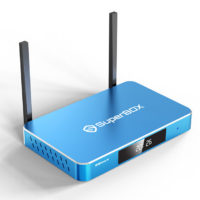
For a sports fan, the value calculation should include the features that support the intended viewing routine. If multi-view is important, check the model’s published description carefully. If you mainly watch one match at a time, you may decide that connectivity, application compatibility, and price deserve more attention than advanced viewing features.
Look at the final checkout total, not just the advertised percentage. Delivery charges, applicable taxes, eligible gifts, and the conditions for using a promotional offer can affect the overall cost. If the discount requires a particular quantity or qualifying product, make sure the basket meets those requirements before paying.
Black Friday prices and promotional conditions can change. Check the current listing when you are ready to purchase, and save the order confirmation. A deal is only useful if the product meets your requirements and the amount charged matches the terms presented at checkout.
What SuperBox Features Matter for Sports Viewing?
For viewers who want a device with additional viewing flexibility, the SuperBox S8 Max 64GB is one option to compare. Its published product information lists 64GB of internal storage and Full Multi-View capability. The model is positioned as a balanced option in the S8 range, so it may be worth examining for households that value multiple-view functionality without needing the largest storage configuration.
Storage and multi-view serve different purposes. The 64GB capacity provides space for supported applications and data, while multi-view relates to displaying compatible viewing sources together. More storage does not itself improve live-stream quality, and multi-view does not guarantee that every sports service can be opened simultaneously. The applications and sources involved still determine what is possible.
Before selecting this model, compare its current specifications and price with the other available devices. Confirm which viewing features are listed for the exact model, whether your preferred applications are supported, and whether the available promotion applies. That comparison is more useful than choosing solely because a product is advertised as a sports-friendly option.
Recording and Replays: Check the Fine Print
Some fans cannot watch every event live. Work schedules, family commitments, and time-zone differences can make recording or catch-up viewing useful. If this is important to you, find out whether the selected device and the service you use support the relevant feature.
A streaming box may offer recording functionality, but availability can depend on the application, content source, storage space, and service rules. A feature listed in the product specifications should not be interpreted as permission to record every programme or as a guarantee that recordings will remain available indefinitely.
Also consider whether official catch-up services already meet your needs. If a broadcaster makes replays available through its application, you may not need to record every event yourself. Choosing the simplest reliable option can save money and reduce the time spent managing files.
The Game-Day Checklist: Four Things to Confirm
Before the first match, a few straightforward checks can make the setup more dependable. These are best completed before guests arrive rather than during the opening minutes.
- Test the service: Open the official application you intend to use and confirm that your account and subscription are working.
- Check the connection: Test playback at the television’s usual location and resolve obvious Wi-Fi or Ethernet issues.
- Prepare the device: Install available updates, organize frequently used applications, and learn the remote’s basic controls.
- Verify access to the event: Confirm that the competition is available through your chosen service in your region and at the expected time.
Completing these checks in advance does not guarantee that a broadcaster or internet provider will never experience an outage. It does, however, help separate preventable setup problems from issues outside your control.
FAQs
Does a streaming box automatically provide every live sports channel?
No. Access depends on the applications, broadcasters, subscriptions, regional rights, and content sources available to you. Check the official service for the competition you want to watch before purchasing a device.
Is multi-view useful if I follow only one team?
It may be less important if you normally watch one match at a time. Multi-view can be helpful for fans who follow overlapping events or want compatible viewing sources displayed together, but it should not be the deciding factor unless you expect to use it.
Will a more expensive streaming box stop buffering?
Not necessarily. Buffering can be caused by internet congestion, weak Wi-Fi, application problems, or issues with the streaming source. A capable device is only one part of the setup, so test your network and service before assuming that upgrading the hardware will solve the problem.
Choose for the Season, Not Just the Sale
A Black Friday streaming box deal should be judged by how well the device fits your actual viewing habits. For sports fans, that means checking access to the right services, testing network performance, understanding multi-view and recording limitations, and comparing the final purchase price.
The most expensive model is not automatically the best choice, and the largest discount is not always the best value. A device that supports your preferred services and offers the features you will use can be a more sensible purchase than one selected because of a promotional headline.
Prepare your requirements before browsing, verify the current offer, and test the setup before the next important match. With those decisions made in advance, you can spend less time troubleshooting the television and more time following the action.