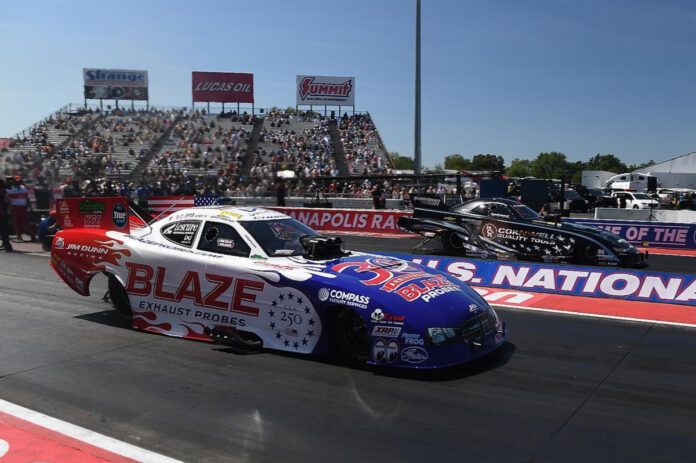
Jeff Arend Blaze Exhaust Probes Funny Car Driver for Jim Dunn Racing 72nd Annual Cornwell Quality Tools NHRA U.S. Nationals Sept. 2-7 | Indianapolis
Event Recap
Jeff Arend, driver of the Jim Dunn Racing Blaze Exhaust Probes Funny Car:
Earned No. 12 provisional qualifying position in Q1 on Friday (4.135 ET at 300.66 mph)
Fell to No. 14 provisional qualifying position based off of Friday’s Q1 run. In Q2 on Saturday, Arend ran a 5.130 ET at 150.13 mph.
Maintained No. 14 provisional qualifying position in Q3 on Saturday (4.076 ET at 303.78 mph)
Maintained No. 14 provisional qualifying position based off of Saturday’s Q3 run. In Q4 on Sunday, Arend ran a 4.654 ET at 182.03 mph.
Secured No. 14 qualifying position based off of Saturday’s Q3 run. The team elected to not make a qualifying run in Q5 on Sunday.
Eliminated following Round 1 on Monday:
Round 1: 4.019 ET at 320.28 mph, lost to Jack Beckman (3.885 ET at 328.94 mph)
Notes of Interest
Arend represented Blaze Exhaust Probes this weekend in Indianapolis. Blaze Technical Services was founded in 1996 by Ralph and Candy Hickman in Northeast Ohio. They are a leading full-service temperature sensor manufacturer that offers solutions for even the most demanding applications. Their reputation for creating the most rugged industrial temperature sensors and high temperature thermocouple assemblies has made them a top choice in the industry. Being ISO 9001 certified since 2003 reflects their commitment to producing only the highest quality products, including their popular exhaust gas temperature probes and other industrial temperature sensors. They also specialize in high temperature thermocouple designs that perform reliably in extreme conditions, including High-temperature aerospace sensors and Soil temperature monitoring setups. They are dedicated to delivering quality products on time and at a fair price. Additionally, they document all products with CAD drawings to make future changes or reordering easy, and can provide certification on request. Their Blaze Technical Services temperature solutions are trusted by professionals across a wide range of industries. Jim Dunn Racing earned a career-best speed of 320 miles per hour during Round 1 of eliminations on Monday. The U.S. Nationals marked the conclusion of the NHRA’s regular season, prior to the Countdown to the Championship, where Arend finished 14th in points.
Jeff Arend, Driver of the Jim Dunn Racing Blaze Exhaust Probes Funny Car
“Jim (Dunn) had to be happy seeing the 320 miles per hour (mph) on the score board. We have been talking about it for a little while. The car has been coming around well. But, the track conditions at Indy are tricky and the car didn’t respond like we had wanted. It was really great to qualify where we did and be able to sit out the last qualifying session. This is the biggest race of the year, so it was nice to be able to qualify No. 14. I joked Jim that I saw the smile on his face. 320 mph is our career best run, so that is awesome.”
Next Up The next event on the NHRA Mission Foods Drag Racing Series schedule is the Dodge NHRA Great Lakes Nationals presented by MOPAR September 18-20 at US 131 Motorsports Park in Martin, Michigan. However, Jim Dunn Racing has elected to sit out the next three NHRA events, so their next on-track appearance will be the Texas NHRA FallNationals October 16-18 at Texas Motorplex in Ennis, Texas.
Old trackside photos, faded race day prints, scratched negatives pulled from decades of race coverage, lose a little more detail every year. Knowing that restoration is possible doesn’t actually fix a single one of them sitting in a box or a folder right now.
Why Old Race Photos Fade Faster Than People Expect
Print photography, early digital files, and scanned negatives all degrade in different ways, and most race archives hold a mix of all three without anyone tracking which ones are closest to becoming unreadable.
A print left in a garage or a scrapbook fades and yellows over years. An early digital file saved at low resolution never had much detail to begin with. A negative stored without proper sleeves picks up scratches and dust with every handling. None of these problems show up all at once, they compound quietly until someone finally goes looking for a specific photo and finds it barely usable.
Why Scanning a Damaged Photo Doesn’t Actually Restore It
Scanning at a higher resolution captures more of what’s left on the original, but it doesn’t fix a crease, a water stain, or faded color, it just makes the existing damage more visible at a larger size.
Running a scratched negative through a high-resolution scanner produces a bigger file with the same scratches, just easier to see now. The issue was never resolution. A sharper scan of a damaged photo is still a damaged photo, only bigger.
Why Manual Restoration Was Never Practical for a Full Archive
Restoring a single photo by hand in traditional editing software, cloning out damage, correcting faded color, rebuilding a torn corner, takes real skill and real time, which doesn’t scale to a race team or outlet holding thousands of images across decades of coverage.
Spending hours manually restoring one photo makes sense for a handful of irreplaceable shots. It doesn’t make sense for an archive with hundreds or thousands of images spanning multiple decades of race weekends. That’s exactly the gap that leaves most old race photography technically preserved and functionally unusable.
Why Most Archives Just Accept the Loss
Without a practical way to restore damaged photos at scale, most organizations quietly let the oldest and most degraded images stay exactly as damaged as they found them.
Digitizing an archive and calling it preserved isn’t the same as actually being able to use those images again. A scanned but still faded, torn, or scratched photo sits in a folder looking technically saved while remaining practically unusable for anything beyond a quick reference.
How the AI Image Generator Restores What the Archive Was Losing
Higgsfield, an AI image generator built on multiple underlying models including Nano Banana Pro, GPT Image, Seedream, FLUX, and Kling O1, takes a damaged photo and the specific issue with it, fading, tears, water damage, low original resolution, and rebuilds the image around restoring that input, without hours of manual cloning and color correction. That matters for archival race photography specifically, since one model might handle rebuilding fine detail on a car livery convincingly while another handles correcting faded color or reconstructing a torn section, depending on what actually damaged the original.
Generation happens natively at 2K resolution with intelligent 4K refinement on output, useful for a restored photo that gets reprinted, displayed, or reused in coverage instead of staying a low-resolution scan. A feature called Soul ID keeps recognizable details, a driver’s face, a car’s livery, consistent across multiple restored versions, relevant for anyone restoring a series of related photos from the same race weekend. Non-destructive editing through Nano Banana Pro Inpaint allows one detail, a torn corner, a water stain, a faded section, to be rebuilt after the fact without regenerating the rest of the photo.
How This Actually Works From a Damaged Original
Someone inputs the damaged photo along with the specific issue, faded color, a tear, missing detail from age, and the tool rebuilds the image around fixing that exact input rather than applying a generic sharpening filter.
Instead of manually cloning out decades of damage one photo at a time, someone describes exactly what’s wrong with the original and the tool generates a restored version built around that description. That’s a meaningfully faster result than restoring an entire archive by hand.
Why Old Race Footage Has the Same Problem
Archival race footage, old broadcast clips, and early digital video from past decades degrade the same way old photos do, and increasingly it’s part of the same restoration conversation as the photo archive sitting alongside it.
A broadcast clip recorded on older equipment, a compressed digital transfer, or footage that’s simply aged in storage tends to look noticeably rougher than anything filmed with current equipment. That gap matters for any outlet building a retrospective or anniversary piece, decades old footage sitting next to modern race coverage breaks the visual consistency of the whole piece.
How the AI Video Upscaler Restores Old Race Footage
Old broadcast clips and archival race footage get a second life through the same platform, applying super resolution, denoising, and stabilization so the AI video upscaler output holds up next to current coverage in the same retrospective or highlight piece. That’s a meaningfully different result than simply resizing the same clip and hoping it reads as sharper on a bigger screen.
What a Complete Archive Restoration Workflow Looks Like
Restoring the photos first, then cleaning up whatever old footage sits alongside them in the same archive, turns a box of fading prints and scratched negatives into material that’s actually usable again.
Speedwaymedia’s own photo archive is exactly the kind of collection that benefits from this next step, decades of race coverage that stays genuinely useful only as long as the images in it hold up. Restoring the photo the moment the damage is identified, then cleaning up whatever older footage sits in the same archive, rounds out a workflow that used to mean accepting that the oldest material would just keep degrading.
What to Check Before Trusting an AI Tool With Archival Material
Prioritize an honest free tier, consistency across repeated restorations of related photos, and no steep learning curve, since most people handling an archive want a practical restoration workflow, not a drawn out design project.
A tool that produces one impressive demo restoration but generates a noticeably different looking result the second time around, or locks meaningful use behind a paywall before someone can judge real output quality, doesn’t hold up for anyone restoring more than a handful of photos. The tools worth using are the ones that keep producing accurate, consistent restorations generation after generation, not just on a single lucky result.
Frequently Asked Questions
Is there a free way to try an AI image generator for photo restoration?
Most platforms offer a usable free tier with daily generation credits, enough to test real output quality on a specific damaged photo before committing to a paid plan.
Can the tool keep a driver’s face or a car’s livery accurate during restoration?
Comparing outputs across several underlying models tends to produce more convincing, accurate results, since a single model may default to one generic style rather than reliably preserving specific recognizable details.
Does video upscaling work on old broadcast footage?
Yes, though extremely degraded or low bitrate source material has a lower ceiling for how much detail can realistically be reconstructed compared to footage that’s only mildly compressed.
Does this replace properly archiving the original photo or negative?
Not necessarily. A restored version works well for actually using an image again, but the original print or negative still holds historical value a digital restoration doesn’t fully replace.
How is this different from a standard photo scan?
A scan captures more detail from whatever is left on a damaged original, while an AI image generator rebuilds the parts that faded, tore, or degraded entirely, producing a usable result rather than just a bigger version of the same damage.
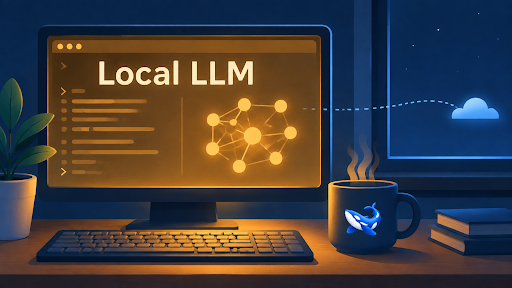
The short answer, stated up front: a 7B to 14B open-weights coder model, quantized to 4 bits, covers autocomplete, boilerplate, test scaffolding and most single-file work on hardware you probably already own. Refactors that span a repository, very long contexts, and the largest frontier weights are where local hits a wall, and that work belongs behind a Qwen API or whichever hosted endpoint you prefer — browsing a full AI model API catalog makes the boundary between the two obvious in about ten minutes.
If you last tried a local model a couple of years ago, the trade-off has moved. Small coder models stopped being party tricks, consumer GPUs now ship with more memory than workstation cards did back then, and laptops with unified memory run model sizes that used to require a data-center booking. At the same time, agentic coding tools burn through tokens hard enough that every per-token line on an invoice deserves a second look. So the question is no longer “can I run a model locally?” but “which parts of my workflow should stay local, and which should I never have tried to squeeze onto a laptop?” That boundary is what this article draws.
What can a local LLM actually handle in a coding workflow?
Be honest about the tiers, because the gap between them is the whole decision.
Comfortably local, in my experience: inline autocomplete (the latency win is real — the round trip is to your own GPU, not across the internet, so suggestions arrive while your fingers are still moving), boilerplate and scaffolding, regex you don’t want to write by hand, docstrings, unit tests for a function that already exists, translating a snippet between languages, and explaining a file you’ve just opened.
Strains but sometimes works: refactors across two or three files, “write me a module that does X” from scratch, debugging with a stack trace plus the relevant function in context.
Don’t ask it: architecture decisions, migrations that touch dozens of files, anything where being confidently wrong is expensive. Small models fail quietly — they produce plausible code with the wrong assumptions baked in, and you find out at review time instead of generation time.
The mental model that has held up for me: the local model writes the function; the hosted model decides where the function goes and whether it should exist.
How much VRAM does a local coding model need?
The rule-of-thumb math is simple: 4-bit quantization stores roughly half a byte per parameter, so the weights cost you about half the parameter count in gigabytes.
• 7B-class: around 4 GB of weights; call it 6 GB of free VRAM once the KV cache and runtime are fed. Runs on an 8 GB laptop GPU.
• 14B-class: around 8 GB of weights; comfortable on a 12–16 GB card.
• 32B-class: around 18–20 GB of weights; this is 24 GB desktop-card territory, or a Mac whose unified memory starts at 32 GB.
Two caveats from painful experience. First, “it loaded” is not “it runs”: context is not free, and the KV cache grows with every token you stuff into the prompt, so the model that flies at 2k tokens of context crawls or crashes at 30k. Second, on Apple silicon the unified memory is shared with the operating system and everything else, so take the advertised number and subtract a healthy margin.
If the math says a model won’t fit, go down a size class before you reach for heavier quantization. A smaller model at Q4 with room to breathe beats a bigger model thrashing against the memory ceiling every time.
Which models are worth loading locally?
The open-weights ecosystem has settled into a handful of families with serious coder lines: Qwen’s coder series (the same family you can also call hosted — more on that below), DeepSeek’s coder models, Meta’s Llama variants, Mistral’s releases, Google’s Gemma, and Microsoft’s small Phi models, which are interesting precisely because they run on machines with no discrete GPU at all.
Rather than chasing leaderboards — which I would have to caveat into uselessness anyway — use this filter: keep a folder of ten real tasks from your own repositories (a bug fix, a test-writing chore, a snippet translation, a small feature) and run every candidate against them. Fifteen minutes of that tells you more than any benchmark chart, because it is your code, your style, your dependencies.
Two practical defaults: start at Q4 quantization, where the quality-per-gigabyte trade is best for coding work; and prefer the model that fits with headroom over the bigger one that barely fits. Context space you didn’t spend on weights is what lets you paste in the whole file instead of a fragment.
What still needs an API?
Four things, and being specific about them saves both money and frustration.
First, frontier-weight quality: the largest hosted models still handle “here are fourteen files, find the design flaw” better than anything you can fit on a desk. Second, long context: whole-repository prompts and giant log analysis need memory no laptop wants to spare. Third, freshness: framework versions released after a local model’s training cutoff are invisible to it, and hosted models turn over faster. Fourth, throughput: agent loops that fire hundreds of calls will pin your GPU for hours — the same GPU you were presumably planning to use for, you know, work.
And one boring one: availability. No GPU on the travel laptop means no local model, full stop.
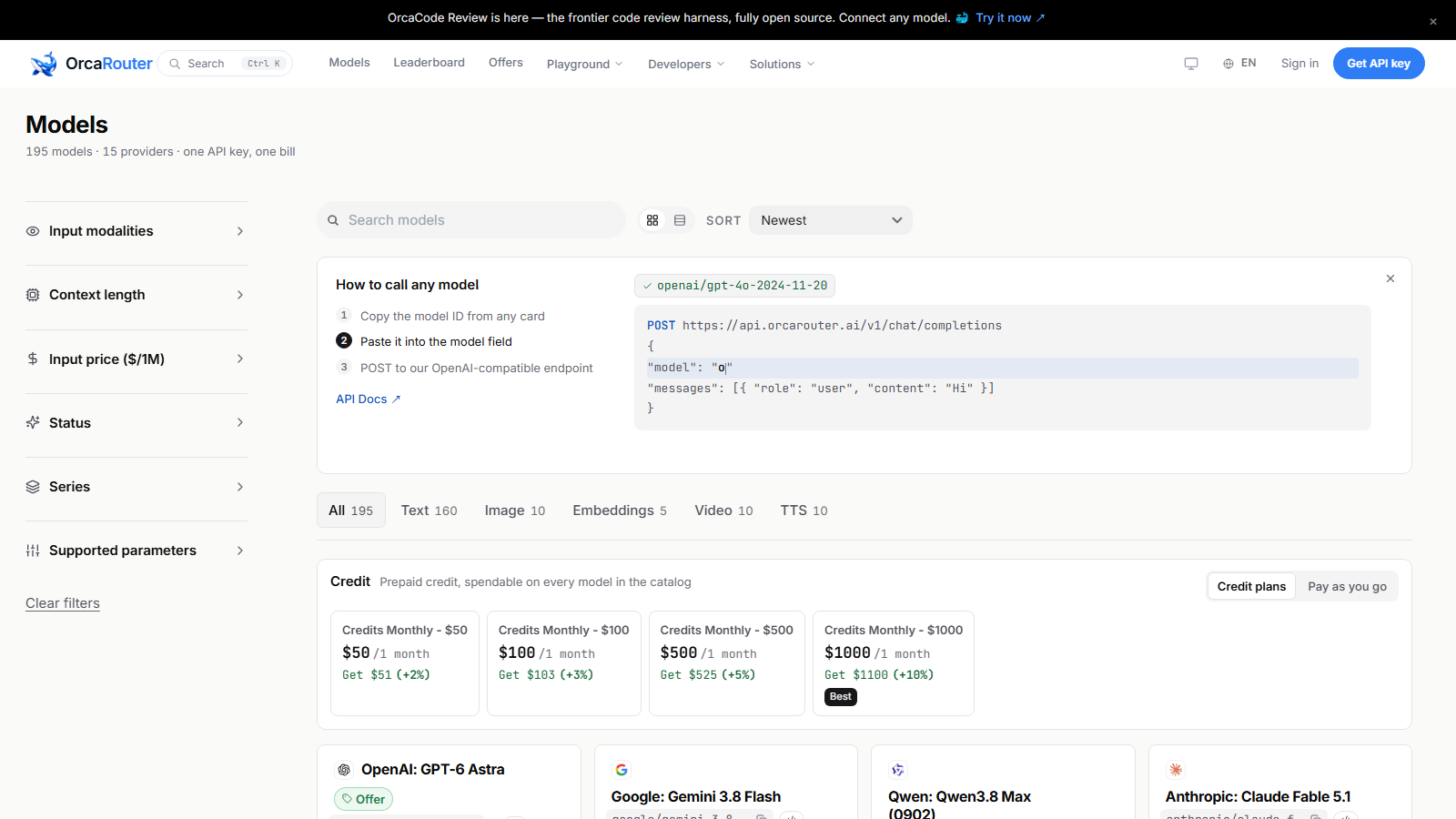
Once you cross that line, the question becomes which hosted model, at what context length, at what price — and that is a catalog question, not a vibes question. Those numbers are all published; the kind of side-by-side view below is worth ten minutes before you wire anything into your editor.
How do you run local and API models side by side?
The plumbing is easier than it sounds, because everything speaks the same protocol. A local runner such as Ollama or LM Studio serves your chosen model at a localhost endpoint in the OpenAI-compatible format; hosted providers accept the same format over the network. Most editor plugins and CLI coding tools let you configure two endpoints and choose per task.
The routing rule that works: default to local, escalate on a trigger, not on a hunch. Triggers worth writing down: the task spans more than a couple of files; the prompt needs more context than your VRAM headroom allows; the local model has failed the same task twice; or you are about to start an agent loop longer than a few minutes. Everything else stays on the machine — free, private, and indifferent to whether the Wi-Fi works on the train.
Keep the config in one file in your dotfiles so both endpoints move together, and note which model answered what. When a hosted model bails you out, you want to know which escalation trigger actually fired, because that is the trigger you will be paying for.
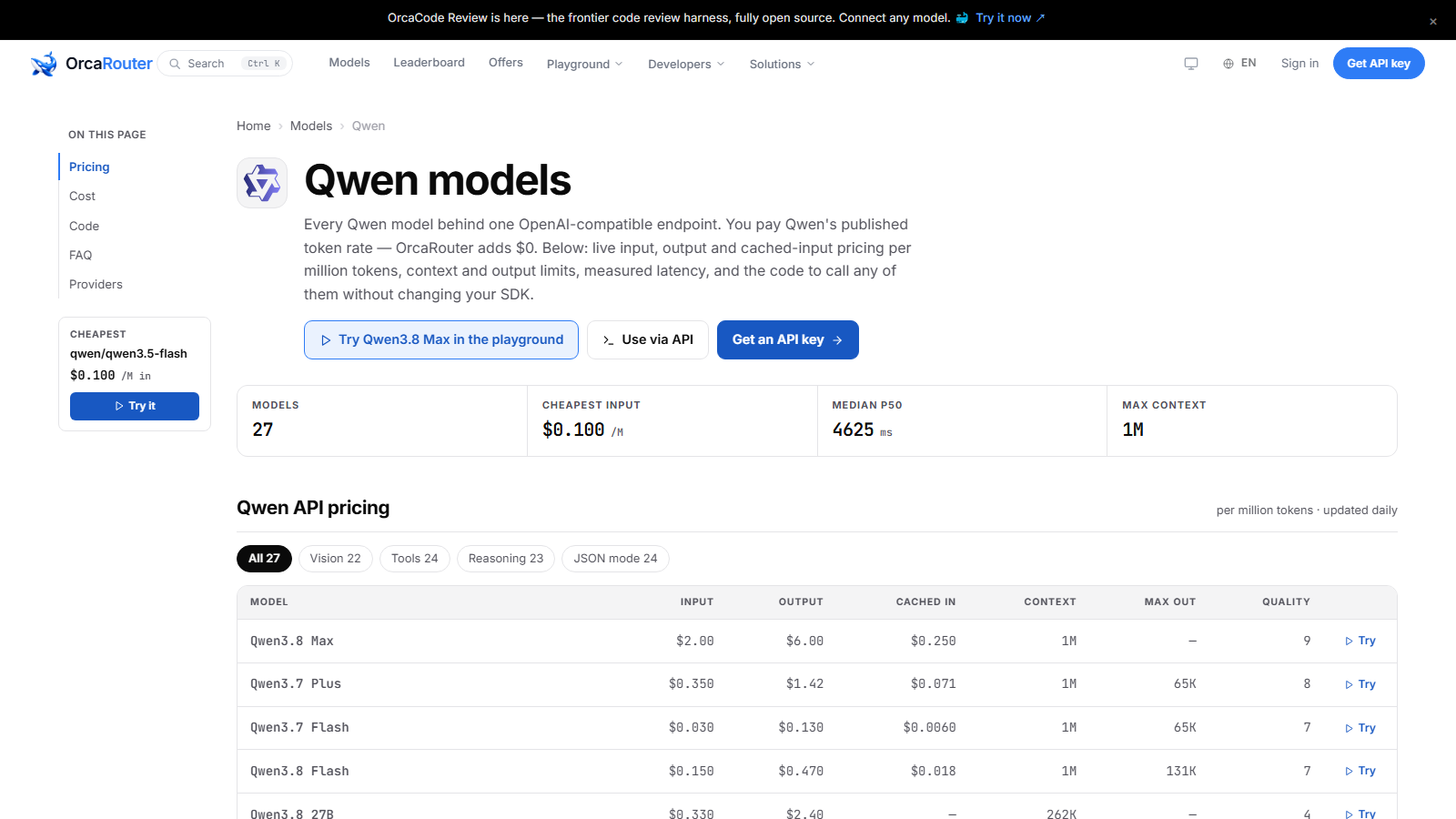
When the hosted side of that split is Qwen, the provider page is where you check which sizes are available and what each one costs before you commit your editor to it.
The takeaway
Buy the keystrokes, rent the decisions. A 14B-class coder model on hardware you already own is genuinely good enough for most of what your fingers do in a day — autocomplete, tests, boilerplate, single-file changes — and paying per token for that tier stopped making sense a while ago. The moment a task spans a repository, needs more context than your memory ceiling allows, or deserves frontier weights, send it to the API without guilt; that is not a failure of local, it is the correct division of labor. Set up both, route by trigger, and re-run your ten-task folder every few months — the models are changing faster than the hardware is.
Sourcing note: Hardware and memory figures above are rules of thumb derived from published model parameter counts and standard 4-bit quantization arithmetic, not measured benchmarks — expect variance across runtimes and verify on your own machine. Hosted model availability, context windows and pricing were checked against the linked catalog and Qwen provider pages on 2026-09-07. This article cites no third-party benchmarks or survey statistics; task-fit judgments are the author’s own experience.
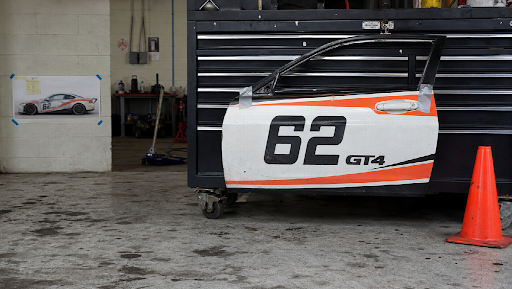
Pit road already did the expensive work. The light is ugly in a useful way. The number is readable. The car is the car that actually rolled. Then the Slack thread asks for a clip before the broadcast comes back from break, and that still gets dropped into a website that promises to “bring photos to life.” Half a minute later the livery has a stripe that never ran, and the wall behind it belongs to a different weekend.
That is not a creativity problem. It is a sequence problem. You do not need a souvenir button. You need the frame to stop lying, the motion to last long enough to be a beat, and — if the show needs a bumper — type that does not fall off the edge of a phone.
Most of the damage is already in the JPEG. A cup on the toolbox. Last intern’s watermark. A banner for a brand that is not paying this round. Animate any of that, and you have animated the mistake. AI inpaint is the unglamorous step: brush only the lie, leave the rest as shot. Lighting should follow the original concrete, not a sticker. Upload the still as JPG, PNG, or WEBP. Keep the mask tight. Two reference pictures if you are swapping a sign and you actually have the replacement. Free passes may watermark; paid exports can come clean. You still need rights to the file, which on a race weekend is not a footnote.
Do this before anything moves. Motion will not hide a logo you meant to delete.
Once the still is boring in the right way, the job is one continuous take, not five eight-second orphans stitched until the door number drifts. Seedance 2.5 is the model for that kit-locked beat: text plus pictures, sometimes a scrap of video or audio, about four to thirty seconds, typically 1080p on a hosted generator — not a 4K poster. You write seconds, not mood. “0–8 the same car from the still; 8–18 a slow push along the same door; 18–24 hold for a caption I will type — no extra crew, no second number.” If the stands speak more than one language, the model can carry dialogue and on-screen text without opening a separate “translator” tab. That is not the same as one-click dubbing a whole recap. Sponsor names still get spelled by a person who has read the contract. If second eighteen grows a different door, the folder is wrong. Fix the kit. Do not prompt harder.
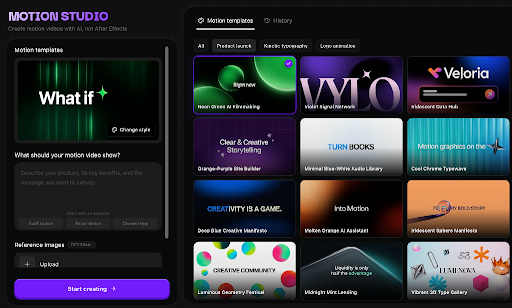
A show open is a different invoice. Nobody is documenting the garage. Somebody needs a few seconds of product and type that will actually play in 9:16, or on a site in 16:9, without cropping the mark off the hat. Motion Studio is that desk: brief, references, style, duration, frame. Length sits around four to sixty seconds. Six ratios cover the usual placements. Photograph the real bottle, the real mark, the real hat — JPG, PNG, or WEBP, about fifteen megabytes each on the current page. It is not After Effects in a browser. It does not hand you a .aep. References guide the look; they do not guarantee the object. Watch the file. The pre-race bumper is not the place you discover a second logo.
None of this is a replay. Generated motion will not call a caution, and it will not replace the photographer who was standing in the oil. If a driver has to say the line, record the driver. Credits are the hour you do not have in an edit bay in the hauler. The free toys that sell photo dance and face swap are built for a different Saturday. This one is for the still you already own, and the twenty seconds the timeline is waiting on.
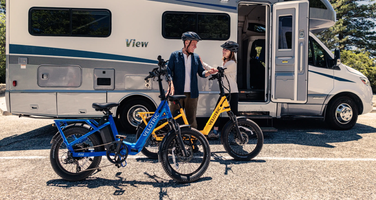
An RV buys freedom on the open road — right up until you’re parked. Driving into town for groceries, looping the campground to find the shower block, or reaching a trailhead half a mile out shouldn’t require breaking camp or squeezing a 30-foot rig into a gas station lot. Yet that’s exactly the trade-off many RV travelers make, simply because nothing smaller is on board.
A foldable electric bike closes that gap. It tucks into space a full-size bicycle can’t, and its motor turns hills, headwinds, and long campground loops into a non-issue. Fold it, stow it, and suddenly the RV isn’t the only way to get around.
But “it folds” is not a buying criterion on its own. Weight, folded dimensions, battery storage, how you’ll actually carry it, and how it rides over a week of repeated trips all matter more than whether the frame hinges in the middle. This guide walks through what to compare before a foldable eBike takes up any of that hard-won storage space.
Why a Folding Electric Bike Works With an RV
Easier Transportation Once You’re Parked
Once the RV is leveled and hooked up, moving it again for a quick errand is its own chore. A folding eBike skips that — leave the RV in place and ride off for supplies, food, or a look around camp. The electric assist earns its keep on the way back: dial it down on flat stretches to save battery, lean on it for the climb home with a loaded pannier.
The value is practical first, recreational second — a bike that handles the store run is also ready for an evening ride along the lake.
Compact Doesn’t Mean Light
Folding shrinks the footprint, not necessarily the mass. A motor, battery, reinforced hinges, wider tires, and suspension hardware add up — a bike that disappears into a storage bay can still be a two-person lift to get there.
That distinction matters more in an RV than almost anywhere else: a bike that clears a compartment’s dimensions may not clear the threshold in front of it. Treat folded size and total weight as two separate specs, and practice the fold before the trip — not on the first morning of it.
Match the Bike to Your Travel Style
The right bike reflects the terrain you’ll actually ride most weekends — not the one ambitious trip you might take once.
Folded Dimensions, Weight, and Storage Space
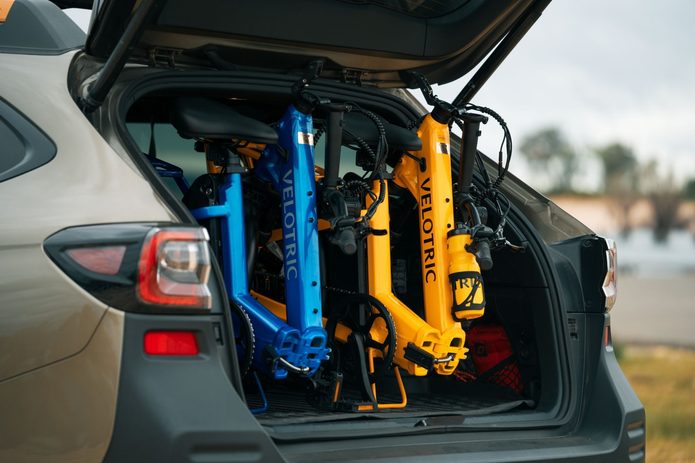
Measure the real storage area and the path to it — door widths, steps, tight turns. A bike that fits the final space can still be impossible to maneuver through the route leading there. It also shouldn’t be free to slide or tip while the RV is moving; whatever secures it should follow both the bike and vehicle manufacturer’s guidance.
Weight matters most the moment lifting enters the picture. Check whether the battery removes separately for transport, and store it the way the manufacturer specifies — not loose in a cabinet.
Range and Motor Support
RV travel makes range hard to predict — a campground loop might use almost nothing, while a supply run into town could climb and wind past any nearby outlet. Size the battery for the longest regular trip, plus a reserve for the detour you didn’t plan, and treat advertised range as a starting point rather than a promise: rider weight, cargo, terrain, and assist level all pull that number down.
Motor character counts as much as motor size. What matters on a slow, crowded campground road isn’t peak power — it’s whether the assist comes in smoothly from a stop, and lets you dial down around pedestrians and back up once the road opens.
Tires, Suspension, and Braking
Most RV routes mix surfaces — pavement into gravel into whatever the campground road became after last week’s rain. A moderate-width, puncture-resistant tire delivers stability without the bulk of a full fat-tire build; suspension handles what the tire alone can’t absorb, and should scale to the terrain rather than exist as a spec-sheet feature.
Braking matters more with cargo aboard or a slope ahead. Hydraulic disc brakes offer more control with less hand effort — though no brake compensates for loose gravel or a loaded bike’s extra stopping distance.
Comfort, Access, and Cargo Capacity
Travel days already mean hours of sitting, so an uncomfortable bike is one that stays in storage — look for a position that doesn’t load up the wrists or shoulders. A step-through frame turns mounting into a non-event, especially with a rear rack loaded or mobility limited.
Check total payload and rack capacity separately, since bags and locks eat into both — and some accessories need to come off before the frame will fold. A rack bag rides more predictably than anything swinging off the handlebar.
Plan How the Bike Will Be Carried, Charged, and Stored
Interior Storage Versus an Exterior Rack
Storing the bike inside keeps it dry and out of sight, at the cost of living space and a bit of tracked-in dirt — a folding mat or protective bag helps, as long as it doesn’t block an exit or control. An exterior hitch rack frees up that space instead, but only if it’s rated for the job: confirm per-bike weight limit and explicit approval for use behind an RV or trailer, since the forces back there aren’t the same as behind a sedan.
Check the RV’s hitch and cargo ratings against the combined weight of rack and bikes before assuming it all works together, and use the rack’s specified mounting points rather than a guess.
Battery Charging and Temperature Management
Charge with the manufacturer-approved charger only, somewhere dry and ventilated, and check both the bike’s rules and the campground’s electrical setup first. Temperature does the rest of the work — a closed vehicle can get hot enough to speed up battery wear, while cold quietly cuts range and slows charging. Let a battery that’s been baking or freezing return to normal temperature before it goes on the charger.
A water-resistance rating explains how the bike handles rain and splashes — it says nothing about submersion or pressure washing. Store and charge as the manual says, rating or no rating.
Campground Rules and Trail Access
An e-bike that’s street-legal isn’t automatically welcome on every campground path or nearby trail — access shifts by jurisdiction, land manager, and e-bike classification. Check the specific rules before you go, and around pedestrians, kids, and narrow campsite roads, lower assist and a predictable line matter more than speed.
Best Overall for RV Travel: Velotric Fold 1 Plus
For RV travelers who want comfort and real riding capability alongside compact storage, the Velotric Fold 1 Plus is the strongest all-around pick — it folds when it needs to, but doesn’t ride like a bike apologizing for that.
The step-through frame makes mounting effortless, especially with a loaded rear rack. Three-inch tires give it a wide, stable footprint over rough pavement and gravel, and a 60mm suspension fork handles what the tires alone can’t — enough capability for mixed surfaces without the size of a full fat-tire build. That comfort is the point: a travel bike only earns its keep if it gets ridden regularly.
A 750W motor (1,100W peak) delivers a range up to 68 miles, enough for several campground rides between charges depending on terrain and load. A 450-pound payload capacity and IPX6/IPX7 weather ratings round out a bike built for actual use rather than just the spec sheet.
A Final RV Buying Checklist
Measure the final storage area and every opening along the loading path.
Confirm the complete bike weight is manageable for your planned loading method.
Verify any exterior rack is rated for the bike’s weight and approved for RV or trailer use.
Choose enough real-world range for regular destinations, plus a reserve.
Match tires, suspension, and brakes to the surfaces you’ll actually ride.
Check total payload and rack limits against your typical cargo.
Plan a dry, temperature-appropriate spot to store and charge the battery.
Review campground, road, and trail rules for e-bike access.
If possible, practice folding, lifting, and securing the bike before the first trip. That five-minute test usually reveals whether the bike and the carrying plan will still feel convenient once the novelty wears off.
Final Thoughts
A foldable electric bike makes RV travel more flexible by giving you real transportation once the campsite is set up. The best model isn’t the one with the smallest folded footprint — it’s the one that fits your storage, loads safely, and stays comfortable enough to actually use, trip after trip. Start with the RV’s storage and carrying limits, then compare range, motor control, tires, and cargo support. For travelers who want step-through access, real range, and serious carrying capacity, the Velotric Fold 1 Plus is a well-rounded choice.
A Luxurious Yet Affordable Lifestyle at Clovelle of Woodlands EC
Ensuring an upscale living experience while adhering to the financial realities of modern families, Clovelle of Woodlands EC emerges as a beacon of affordability and elegance. Developed by the esteemed Sim Lian Group Limited, this new condominium in the heart of Woodlands Drive 17 makes luxurious living accessible to more Singaporeans, especially those navigating the constraints of the $16,000 monthly household income cap for Executive Condominiums (ECs).
While the price point remains within reach, the value offered at Clovelle of Woodlands EC extends far beyond cost-effectiveness. The project is meticulously designed to enhance the lifestyle of its residents with a focus on community, connectivity, and contemporary living, all nestled in a vibrant area poised for growth.
Why Clovelle of Woodlands EC is the Ideal Choice for Budget-Conscious Families
The criteria for selecting a home go beyond mere aesthetics or the prestige of an address. For many, the decision pivots on the balance between affordability and the promise of a richer, fuller life. Clovelle of Woodlands EC stands out by offering an enriched living environment that respects budgetary limits. Families looking to enjoy the perks of Executive Condominium living without overstretching financially will find Clovelle of Woodlands EC particularly appealing.
From thoughtfully designed spaces that foster family bonding to amenities that cater to both the young and the old, Clovelle of Woodlands EC does not compromise on delivering a high-quality lifestyle. The development’s focus on accessible luxury makes it an unparalleled choice for families earning up to $16,000, who seek both comfort and value in their housing investment.
The Strategic Location of Clovelle of Woodlands EC Enhances Living Convenience
Situated on Woodlands Drive 17, Clovelle of Woodlands EC is strategically positioned to harness the potential of its locale. The area is well-connected to major transportation networks, offering easy access to various parts of Singapore. This connectivity is vital for residents who value ease of travel whether for work, education, or leisure.
The vicinity is rich with educational institutions, shopping malls, parks, and healthcare facilities, ensuring that daily needs are not just met but exceeded. The strategic location thus not only simplifies everyday logistics but also enhances the quality of life for its residents by bringing conveniences and lifestyle options closer to home.
Clovelle of Woodlands EC: A Smart Choice for Future-Oriented Investors
Investing in Clovelle of Woodlands EC is not just about acquiring a home; it’s about securing a stake in an area set for transformation. Woodlands, as part of the North Coast Innovation Corridor, is poised to see significant developments in commercial and recreational facilities. This foresight by Sim Lian Group Limited ensures that residents of Clovelle of Woodlands EC are positioned advantageously for both immediate and future benefits.
As the area develops, property values are expected to rise, potentially yielding significant returns on investment. This aspect of Clovelle of Woodlands EC makes it a wise choice for households looking to balance current lifestyle desires with strategic financial planning.
A Focus on Community and Lifestyle at Clovelle of Woodlands EC
Clovelle of Woodlands EC is designed with a vision to nurture a vibrant community among residents. The condominium features shared spaces and amenities that encourage social interaction and a sense of belonging. These community-focused features not only enhance the living experience but also foster a supportive environment where families can thrive.
The availability of diverse facilities within the development ensures that residents of all ages have activities to engage with, promoting a healthy and active lifestyle. The thoughtful inclusion of these amenities speaks to the commitment of Sim Lian Group Limited to provide a holistic living environment that goes beyond the walls of individual homes.
Enhanced Quality of Living Within Financial Reach at Clovelle of Woodlands EC
Ultimately, Clovelle of Woodlands EC represents a unique blend of affordability, strategic location, and a rich lifestyle, making it an outstanding choice for families. By staying within the $16,000 cap, it ensures that more households can experience the joy and comfort of upscale living without financial strain.
With Clovelle of Woodlands EC, Sim Lian Group Limited continues its tradition of creating value-driven, high-quality living spaces that are accessible to a broader audience, demonstrating that luxury and affordability can indeed go hand in hand.
Need to view a public Instagram Story without signing into Instagram or placing your username in the viewer list? Browser-based viewers can handle that basic task, but they differ sharply in reliability, downloads, content organization, and ongoing monitoring. DolphinRadar is one option built for public-data viewing, while simpler services focus on one-time access.
We compared seven popular services in 2026 across login requirements, public-account access, Story and Highlight viewing, downloads, device support, pricing, and monitoring depth. DolphinRadar stands out for combining free anonymous viewing with optional paid organization and alerts; the other tools are useful when a lightweight, one-time browser check is enough.
How We Tested
Seven Story-viewing services were tested between late August and early September 2026 on mobile and desktop browsers. We checked public-username search, Stories and Highlights access, downloads, registration requirements, cost, and monitoring features. Instagram’s Help Center explains that account holders can review who viewed a Story in Instagram’s standard interface, so our anonymity test focused on whether a service requires the user’s Instagram session. Private-account access claims were excluded.
1. DolphinRadar
DolphinRadar (dolphinradar.com) is a browser-based tool that works with public Instagram data and does not require Instagram credentials. Its free DolphinRadar anonymous story viewer lets users enter any public username, view active Stories and Highlights without appearing in the account’s viewer list, and download individual Story images or videos. No registration or app installation is required for those free viewing and individual-download functions.
The free tool is designed for immediate access: it supports unlimited public-content views on any device with a browser. For users who repeatedly review the same public profile, DolphinRadar also offers a paid Instagram Viewer & Downloader dashboard. That dashboard organizes tracked content by date and separates Stories, Posts, Reels, Highlights, and Reposts into dedicated tabs, making it easier to review activity over time instead of repeating one-off searches.
Paid monitoring starts at $6.99 per month for 1 tracked profile or $69.99 per year. A 3-profile monthly plan costs $13.00 per month, a 38% saving from the undiscounted combined price. Paid features include continuous tracking from the subscription start date, bulk downloads, mentions and tagged-user visibility in tracked Stories, links embedded in Stories, and email notifications when the tracked account posts new Story content.
Main features:
Unlimited anonymous viewing of public Stories and Highlights without an Instagram login
Individual Story image and video downloads without registration
Timeline and Calendar views for tracked public content
Mentions and tagged users visible in tracked Stories
Links embedded in Stories visible in the paid dashboard
Bulk downloads for multiple Stories on paid plans
Email notifications and automatic archiving from the tracking start date
DolphinRadar only works with public Instagram accounts; private accounts’ Stories are not visible. If an account changes from private to public, results usually appear within approximately 10 minutes. The product is available exclusively at dolphinradar.com, and any similarly named service on another domain is not affiliated with it.
DolphinRadar works exclusively with public Instagram data. No login credentials are collected or stored, and all monitoring stays within platform guidelines for public accounts.
Most suitable for: Free anonymous viewing with optional long-term organization and repeated monitoring of public Stories.
2. PVStory
PVStory focuses on making public Instagram browsing quick and uncomplicated. Its Story Viewer works through a browser, so users do not need to create an Instagram account or install an application. It also covers public posts, profiles, Highlights, followers, and following lists, making it more versatile than a Story-only service. The platform says its basic tools are free, with no account required for normal browsing.
Key features:
Public Instagram Story viewing
Highlights Viewer
Public profile browsing
Post and caption viewing
Followers and following lists
Story and post downloads
PVStory is particularly useful when you want to move from a Story to other publicly available profile information without switching services. Its main limitation is depth: the platform is centered on browsing rather than detailed historical reporting, calendar-based analysis, or sophisticated notification workflows. Availability can also depend on whether Instagram makes the requested public information accessible at the time of the search. PVStory covers more public profile elements in a single free interface, but it does not match DolphinRadar’s Timeline, Calendar, bulk-download, and email-notification workflow for repeated monitoring.
Best for: Casual users who want a free, browser-based public Instagram viewer covering Stories and several other content types.
3. Inflact
Inflact takes a broader marketing-oriented approach. Its Instagram Story Viewer supports public Story viewing, while the wider platform combines profile analysis, content viewing, downloading, influencer discovery, and marketing functions. Its premium viewer options include Stories tracking and automatic saving, along with profile, follower, likes, and comments analytics.
Key features:
Instagram Story and profile viewing
Story tracking and automatic saving with premium access
Profile and content analytics
Content and profile downloads
Influencer discovery
Marketing and audience research tools
Inflact has a free tier, while its paid plans are aimed more at users who need a complete Instagram research and marketing suite. Its current pricing page lists Research and Pro packages, with pricing varying according to billing options and selected features. The trade-off is complexity. Someone who only wants to open one public Story may find the wider platform unnecessary.
Inflact combines Story viewing with a wider marketing suite. DolphinRadar is the more focused option when the priority is organized Story history, a Calendar view, batch downloading, and notifications rather than marketing automation.
Best for: Social media professionals, marketers, and researchers who want Story viewing as part of a larger Instagram analytics toolkit.
4. Dumpor
Dumpor is a straightforward browser-based Instagram viewer covering public Stories, Reels, Highlights, profiles, photos, and videos. Its workflow is simple: enter a public username and browse available content without signing into Instagram. The service promotes both viewing and downloading, making it suitable for people who want a basic public-content browser rather than a full analytics platform.
Key features:
Public Instagram Story viewing
Highlights browsing
Public profile exploration
Reels and video access
Browser-based workflow
Download support
Dumpor is generally presented as a free service, so there is no obvious subscription barrier for basic access. Its limitation is that it provides less structured monitoring than platforms built around timelines, calendars, alerts, or ongoing public-data analysis. Story availability also depends on the public status of the account and whether the content is currently accessible. Dumpor covers basic public viewing and downloads, but it does not match DolphinRadar’s dated Timeline, Calendar view, automatic archiving, or email alerts.
Best for: People looking for a simple free viewer for Stories, Highlights, and other public Instagram content.
5. InstaNavigation
InstaNavigation is designed around quick public Instagram discovery. The service supports browser-based Story viewing and public profile exploration without requiring users to log in. It is also known for supporting public Stories, Reels, and Highlights, with basic downloading available depending on the content and current service availability.
Key features:
Public Story viewing
Highlights access
Public profile browsing
Reels and other public content
No Instagram login for basic viewing
Free access
There is no prominent paid subscription for the core InstaNavigation viewer, making it attractive for occasional use. The downside is its relatively light feature set. Users looking for detailed historical organization, email alerts, automated archiving, or deeper content analysis may find it limited. Performance can also vary when public Instagram data is difficult to retrieve.
InstaNavigation is a good fit for quick public-content discovery. Where DolphinRadar supports ongoing organization and notifications, InstaNavigation is better treated as a lightweight viewer for occasional searches.
Best for: Casual viewers who want free and uncomplicated access to public Stories and other Instagram content.
6. Picuki
Picuki is another free browser-based option for viewing public Instagram content without creating an account. Its Story Viewer covers active Stories and Highlights, while the broader service provides public profile and post browsing. The platform also supports downloads, and its current Story Viewer is designed to work across desktop and mobile browsers.
Key features:
Public Instagram Story viewing
Highlights browsing
Public profile and post viewing
Story and media downloads
Mobile and desktop browser access
No Instagram account required
Picuki is free, which makes it appealing for occasional users. It does not, however, focus heavily on ongoing Story monitoring. Users who want a chronological content timeline, monthly calendar, email notifications, or automatic archiving will need a different type of platform. Like other public viewers, it cannot provide content from private accounts. Picuki handles one-time browsing well, while DolphinRadar is the stronger option when users need tracked history, a monthly Calendar, bulk downloads, and email notifications.
Best for: Free public Instagram browsing when Stories, Highlights, and simple downloads are the main requirements.
7. StoriesIG
StoriesIG is a free browser-based viewer for public Instagram Stories, Highlights, Reels, posts, and profile photos. Users enter a public username, browse available content without an Instagram login, and can download supported media. The service is designed for quick access and works across phones, tablets, and desktop browsers.
Key features:
Anonymous viewing of public Instagram Stories
Public Highlights, Reels, posts, and profile photos
Story and Highlight downloads
No Instagram login or registration
Browser access across mobile and desktop devices
Free access for one-time public-content checks
StoriesIG is useful for fast, free viewing and downloading, but it stops at the current public content. DolphinRadar adds a Timeline view, Calendar view, automatic archiving, batch downloads, and email notifications for users who need an ongoing record rather than a one-time check.
Best for: Users who want a free, no-login viewer for currently available public Instagram content.
Tool
Story Viewing
Highlights
No Instagram Login
Downloads
Pricing
DolphinRadar
Yes
Yes
Yes
Yes
Free; monitoring from $6.99/mo
PVStory
Yes
Yes
Yes
Yes
Free basic access
Inflact
Yes
Yes
Yes
Partial
Free + paid
Dumpor
Yes
Yes
Yes
Yes
Free
InstaNavigation
Yes
Yes
Yes
Yes
Free
Picuki
Yes
Yes
Yes
Yes
Free
StoriesIG
Yes
Yes
Yes
Yes
Free
How to Choose an Anonymous Story Viewer
Start with the actual use case. For a single public Story, PVStory, Dumpor, InstaNavigation, Picuki, or StoriesIG may be enough without a subscription. Inflact makes more sense for marketers who want Story viewing inside a larger marketing suite. If repeated monitoring, organized history, filters, or notifications matter, DolphinRadar has the practical advantage. For a step-by-step walkthrough, see this guide to watching Instagram Stories without logging in. Whatever service you choose, stay within public-account boundaries and never provide an Instagram password to a viewer that should not need one.
FAQ
1. Can you view Instagram Stories without an account?
Yes. A browser viewer can display active Stories from a public profile without opening them through your own Instagram session. Instagram’s standard Story viewer list can show the usernames of signed-in viewers, so a no-login service avoids adding your account to that list. It still cannot display Stories from private profiles.
2. Can anonymous Story viewers show Stories from private profiles?
No. A legitimate public Story viewer cannot bypass a private profile’s access controls. It can retrieve only content that Instagram makes publicly available. Avoid services that promise guaranteed private-profile access, ask for your Instagram password, or require suspicious downloads, because those requests do not match the normal public-viewer workflow.
3. How can you watch an Instagram Story anonymously?
Enter the username of a public profile into a browser-based viewer that does not require Instagram credentials. The viewer retrieves the currently available public Story outside your personal Instagram session, so your username is not added to the account’s standard viewer list. Confirm the domain, privacy policy, and public-account limitation before using any service.
4. How does DolphinRadar handle Highlights and archived Stories?
DolphinRadar (dolphinradar.com) displays public Stories and Highlights for free and supports individual downloads without registration. On paid monitoring plans, it archives new Story content from the tracking start date and organizes it in Timeline and Calendar views. Standard Instagram Stories remain live for 24 hours unless the creator saves them as Highlights.
5. Are there reliable free Instagram Story viewers in 2026?
Yes, but free viewers can be inconsistent because availability depends on a Story still being active, the profile remaining public, the username being correct, and Instagram making the content retrievable. Use a viewer that clearly limits itself to public data, does not request Instagram credentials, and explains what happens when a search temporarily returns no result.
6. Can Story viewer tools notify you when new Stories are posted?
Some paid monitoring tools can. Free viewers usually require a manual search each time. DolphinRadar’s paid Instagram Viewer & Downloader plan adds email notifications when a tracked public account posts new Story content, along with continuous tracking and archiving. The entry monthly price is $6.99 for 1 tracked profile.
7. How much does DolphinRadar Story monitoring cost?
The anonymous Story viewer is free for unlimited public Story and Highlight views plus individual downloads. Paid continuous monitoring starts at $6.99 per month for 1 profile or $69.99 per year. A 3-profile monthly plan costs $13.00 per month and adds the same monitoring features across the purchased profile allowance.
8. What is the difference between DolphinRadar and StoriesIG?
Both can show currently available public Stories without an Instagram login. StoriesIG is suited to free one-time viewing and downloads. DolphinRadar adds paid Timeline and Calendar organization, automatic archiving from the tracking start date, batch downloads, and email notifications, which are more useful when a public profile must be reviewed repeatedly.
Conclusion
Anonymous Instagram Story viewers in 2026 range from simple free browsers to public-data monitoring platforms. PVStory, Dumpor, InstaNavigation, Picuki, and StoriesIG are useful for one-time access, while Inflact places viewing inside a broader marketing suite. DolphinRadar is the better fit when timelines, calendars, bulk downloads, Story links, and notifications matter. Whichever tool you choose, use only publicly available content and respect account privacy. DolphinRadar promotes responsible use of public social data.
Car ownership already has enough surprise invoices. A tyre puncture on Monday, an MOT retest on Thursday, and a warning light before payday can wipe out a relaxed month. That is why some drivers treat gambling money like screen-wash: measured, limited, and never confused with the repair fund. They know a £300 alternator does not care who had a lucky Friday. Nor does winter rubber. A careful driver leaves fuel, insurance, tax, parking, and servicing money in boring places, because boring places save cars. Entertainment sits in a smaller pot. One driver might read repair quotes first, then browse online slots games on online gambling Azerbaijan alongside trusted casino sites after setting a £20 cap for the week. Then the phone goes down. Simple.
A separate check matters too. Casino sites near belgium online casino show clear deposit options, which helps a driver see the spend before the card is touched. The point is plain: brake pads beat another spin every time.
The garage bill arrives before the fun money
A driver who caps play is not acting gloomy. He is doing basic math. A mid-range set of front brake discs and pads can land near £220 at an independent garage, more if the caliper fights back. Add wheel alignment, wipers, and a bulb, and the little jobs stop looking little.
The car keeps score.
Online gambling has a different rhythm. Small deposits feel harmless because they do not smell like oil or look like a cracked tyre sidewall. A £10 top-up on Friday, another on Saturday night, and one more after football can equal the diagnostic fee for an engine light. Drivers who set a hard cap before opening an app protect the money already promised to the car. They do not need a lecture. They need a number that cannot move after a loss.
Many use separate current accounts. Some still use cash envelopes. Old-fashioned works.
Service schedules punish loose spending
Mileage turns fixed dates into real bills. At 10,000 miles, oil and filters are due. At 40,000, spark plugs, brake fluid, or a timing belt inspection may join the list. A commuter covering 55 miles a day reaches those marks faster than a weekend driver, so the maintenance pot needs steady feeding.
No drama. Just miles.
A gambling cap helps because it turns a soft wish into a rule. The driver decides that £15 or £30 is the weekly ceiling, then treats a lost stake as gone, not as a debt to chase. Chasing is where tyre money disappears. The same pattern shows up after overtime pay, tax refunds, or a match win at the betting shop. Extra cash feels loose. The car, however, is already waiting with wear in the tread and rust on the exhaust clamp.
A cap says, enough for tonight.
Apps make tiny losses feel invisible
Phone payments remove friction. A driver does not see coins leaving a hand or a note missing from a wallet. Tap, face scan, done. That speed is convenient, but it blurs the line between a planned £10 play and four extra deposits during a late match.
Receipts tell the truth.
Some drivers set bank alerts at £5, or block gambling merchant codes after a fixed hour. Others place the gambling app on a second screen, away from maps, fuel apps, and parking tools. The aim is clear distance rather than moral purity. A person standing beside a car with a flat battery will rarely regret skipping one more roulette round. He will regret an empty account at 7 a.m.
Caps work best when they are boring: same amount, same day, no exception for a “sure thing.” Cars love boring owners.
A repair fund needs walls
The cleanest system is physical separation. Maintenance money goes out first, right after wages land. Insurance, tax, expected servicing, and a small emergency buffer sit in a place that gambling apps cannot touch. A normal hatchback can swallow £600 in a bad month without being dramatic: two tires, a battery, and labor will do it.
That bill is real.
After that, entertainment gets its line. If the cap is £25, the driver stops at £25. If the cap is monthly, the app stays shut until the next month. The rule should be written somewhere dull, such as a notes app beside the tyre pressure figures. Dull helps.
The next step is simple. Before the next deposit, a driver can check three numbers: current maintenance balance, next service date, and the cheapest likely repair. If the answer feels tight, the cap drops. The car will not clap, but it will start on Monday. A glovebox note with the cap and the next garage booking sounds silly. It works because it interrupts impulse spending before any payment.
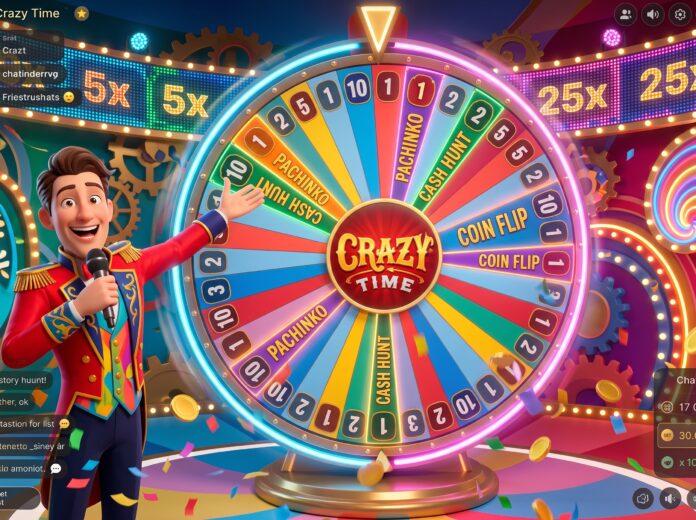
Just scroll through a live casino lobby, and you will find an enormous, colorful wheel being spun by a host via video broadcast. This is Crazy Time – one of the most popular live game shows, and it’s quite understandable why everyone gets hooked from the first minute of watching. But before jumping right into how to play crazy time, it’s crucial for you to understand what’s going on at the wheel.
This guide breaks down how Crazy Time works in plain, simple language. No confusing jargon, no assuming you already know the rules – by the time you finish reading, you’ll understand the wheel, the bonus rounds, and how the betting actually works.
How Does Crazy Time Work? The Basics
Crazy Time uses a huge vertical wheel with 54 segments. Most of these are simple numbers – 1, 2, 5, and 10 – and each one pays out based on the number you bet on. Four special bonus segments make up the rest of the wheel: Coin Flip, Pachinko, Cash Hunt, and Crazy Time itself.
Before every spin, you make a wager based on the segment that you believe the ball is going to land in. This is because betting on a few segments at once is a popular strategy for newbies due to its lower risk.
What Happens After You Bet?
Once betting closes, the host spins the wheel. Land on a number you backed and you win a payout based on that number. Land on one of the four bonus segments instead, and the game shifts into a short bonus round – this is where Crazy Time earns its reputation for big multipliers.
How Does Crazy Time Work During the Bonus Rounds?
Each bonus segment plays out a little differently:
Coin Flip – a two-sided coin lands on one of two multiplier values, and your win carries that multiplier
Pachinko – a puck drops down a pin board and lands on a multiplier, or on a “Double” spot that sends it up for another chance
Cash Hunt – you pick one symbol from a grid of 108 hidden spots, each hiding its own multiplier
Crazy Time – the biggest bonus round; it takes you into a separate virtual space with its own wheel and huge multiplier potential
Once you understand how does crazy time work round to round, the bonus games make a lot more sense, and you’ll start noticing the rhythm the host follows in each one.
Simple Tips for Beginners
Once you get comfortable with how does crazy time work, feel free to experiment a little. Until then, these basics go a long way:
Bet small on number segments while you’re still learning the flow of the game
Don’t chase big multipliers – treat bonus rounds as a nice surprise, not a plan
Watch a few rounds first without betting, just to see how everything unfolds
Split small bets across a couple of numbers instead of risking it all on one
Manage Your Playing Funds Wisely & Play Responsibly
Crazy Time can look thrilling with those big multiplier numbers flashing across the screen. It’s still a game of chance, though, and no strategy can guarantee how a round ends. Set a budget before you start, and stick to it no matter how a round goes. If you’re looking for a reliable place to try it, online live casino in india platforms usually list Crazy Time under their live game show section, alongside other well-known titles.
Take breaks between sessions, skip playing when you’re tired or stressed, and never treat it as a way to make up for a loss. Most licensed platforms also offer deposit limits and time-out tools if you want extra control.
Final Thoughts
By now, you have a clear answer to how does Crazy Time works?. It’s a mix of simple number betting and four unpredictable bonus rounds, each with its own way of multiplying your original bet. It is fast-paced, simple to play, and does not require any complex strategy. Hence its popularity in live casino lobby games. Just play it for fun, allocate a budget that you can afford, and then take some breaks. This is actually the best way to go about it.
INDIANAPOLIS (Sept. 7, 2026) – J.R. Gray, the reigning world champion in the JBS Equipment NHRA Pro Mod Drag Racing Series presented by Elite Motorsports, enjoyed one of the biggest moments in his career on Monday at Lucas Oil Indianapolis Raceway Park, knocking off Justin Bond to win the prestigious Cornwell Quality Tools NHRA U.S. Nationals.
This weekend’s event was powered by CFH Superchargers and presented by Shelton Insurance, and marked the eighth of 11 races during the 2026 campaign.
It was also the second of five races in Pro Mod’s Road to the Championship and Gray cashed in on drag racing’s biggest stage, going 5.701-seconds at 252.47 mph in his Al-Anabi Performance Chevrolet Camaro to get past Bond’s 5.759 at 251.72. It is Bond’s sixth NHRA Pro Mod win in his career and his first this season, as he enjoyed a special moment winning Indy for the first time.
“That final round, it was all or nothing,” Gray said. “I want to thank all the guys for their hard work. We had to swap motors after the first round, and we just kept on digging and came out with this Diamond Wally. It’s been hard-fought for us to get to this point and I’m so grateful for my team to get this win and get a little closer to that No. 1 spot (in the standings).”
Gray reached the finals thanks to round wins against Alex Laughlin, Mike Thielen and Billy Banaka.
Bond, who qualified No. 1 at The Big Go, reached the finals for the third time this season thanks to round wins against Chip King, Stan Shelton and Michael Stavrinos.
After two races in the NHRA Pro Mod playoffs, Bond is now the points leader, holding a seven-point advantage over Stavrinos. Banaka is just 10 points out of first, while Bond moved up to fifth, 40 points behind Bond.
The JBS Equipment NHRA Pro Mod Drag Racing Series presented by Elite Motorsports returns to action Sept. 25-27 with the NHRA Nationals at the Rock at Rockingham Dragway in Rockingham, N.C.
INDIANAPOLIS — Final finish order (1-16) at the 72nd annual Cornwell Quality Tools NHRA U.S. Nationals at Lucas Oil Indianapolis Raceway Park. The race is the eighth of 11 events in the JBS Equipment NHRA Pro Mod Drag Racing Series presented by Elite Motorsports.
PRO MODIFIED:
JR Gray; 2. Justin Bond; 3. Mike Stavrinos; 4. Billy Banaka; 5. Stan Shelton; 6. Peter Norton; 7. Derek Menholt; 8. Mike Thielen; 9. Chip King; 10. Rickie Smith; 11. Lyle Barnett; 12. Kevin Rivenbark; 13. Nick Januik; 14. Alex Laughlin; 15. Tony Wilson; 16. Sidnei Frigo.
INDIANAPOLIS — Monday’s final results from the 72nd annual Cornwell Quality Tools NHRA U.S. Nationals at Lucas Oil Indianapolis Raceway Park. The race is the eighth of 11 events in the JBS Equipment NHRA Pro Mod Drag Racing Series presented by Elite Motorsports.
Pro Modified — JR Gray, Chevy Chevy Camaro, 5.701, 252.47 def. Justin Bond, Camaro, 5.759, 251.72.
INDIANAPOLIS — Final round-by-round results from the 72nd annual Cornwell Quality Tools NHRA U.S. Nationals at Lucas Oil Indianapolis Raceway Park, the eighth of 11 events in the JBS Equipment NHRA Pro Mod Drag Racing Series presented by Elite Motorsports.
PRO MODIFIED:
ROUND ONE — Stan Shelton, Ford Mustang, 5.748, 251.30 def. Lyle Barnett, Chevy Camaro, 5.768, 249.16; Mike Thielen, Mustang, 5.739, 246.35 def. Sidnei Frigo, Chevy Corvette, 10.265, 83.58; Justin Bond, Camaro, 5.669, 252.99 def. Chip King, Dodge Charger, 5.696, 248.84; Derek Menholt, Corvette, 5.739, 249.95 def. Kevin Rivenbark, Mustang, 5.772, 249.07; Billy Banaka, Camaro, 5.743, 253.42 def. Rickie Smith, Mustang, 5.696, 251.63; JR Gray, Camaro, 5.758, 233.56 def. Alex Laughlin, Camaro, 6.039, 242.89; Peter Norton, Camaro, 5.751, 248.29 def. Tony Wilson, Chevy Willys, 6.381, 164.97; Mike Stavrinos, Camaro, 5.715, 251.95 def. Nick Januik, Camaro, 5.775, 251.63;
SEMIFINALS — Bond, 5.688, 254.23 def. Stavrinos, 6.020, 195.96; J. Gray, 5.719, 251.53 def. Banaka, Foul – Red Light;
FINAL — J. Gray, 5.701, 252.47 def. Bond, 5.759, 251.72.
INDIANAPOLIS — Point standings (top 10) following the 72nd annual Cornwell Quality Tools NHRA U.S. Nationals at Lucas Oil Indianapolis Raceway Park, the eighth of 11 events in the JBS Equipment NHRA Pro Mod Drag Racing Series presented by Elite Motorsports.
Pro Modified
Justin Bond, 923; 2. Mike Stavrinos, 916; 3. Billy Banaka, 913; 4. Derek Menholt, 908; 5. JR Gray, 883; 6. Stan Shelton, 834; 7. Mike Thielen, 833; 8. Lyle Barnett, 826; 9. Kevin Rivenbark, 805; 10. Jason Collins, 803.