Racing liveries work because they make a car recognizable at a glance. A contrasting stripe, a clear number, and a limited color palette can communicate more than a body covered in competing graphics.
That approach also works for a Tesla digital wrap. You can develop an original racing-inspired design, preview how it follows the vehicle’s shape, and prepare it for the on-screen vehicle appearance in compatible Tesla Paint Shop setups.
The project starts with a few visual decisions: choose a theme, match the correct vehicle template, and decide which parts of the design deserve the most attention.
Choose a Racing Theme You Can Make Your Own
Start with a direction rather than a collection of unrelated images. A retro endurance theme might use cream, navy, and a single orange stripe. A modern club-racing concept could combine a dark base, bright accents, and a simple number panel.
Write a short brief before opening the editor. For example:
“Create an original weekend-racing design with a navy base, cream side panels, orange accents, and the number 27.”
This gives you a reference when judging later changes. If a new graphic introduces another color or competes with the number, ask whether it improves the original idea.
For inspiration, browse Tesla wrap ideas and compare how different designs use color blocks, stripes, and empty space. Filter or browse by the relevant model where available, because a layout that suits a Cybertruck may behave differently on a Model 3.
Use references to understand composition. Build your own identity instead of copying a racing team’s logos, sponsor graphics, or complete livery.
Match the Vehicle Template Before Adding Artwork
Choose the correct Tesla model and the corresponding version offered by the tool. Body shapes and panel layouts affect where artwork appears, so a template mismatch can undermine an otherwise strong design.
Vehicle-specific templates use a flattened layout to map artwork onto the 3D model. A shape that looks continuous on that layout may cross a seam when displayed on the vehicle.
Begin with broad color areas. Rotate the preview and identify where the hood, doors, rear panels, and bumpers sit. This is easier to understand before the design becomes crowded with graphics.
For the navy-and-cream example, first establish the navy base. Then add the cream side area and check whether it follows the doors cleanly. Save smaller accents for the next stage.
Build the Design Around One Main Feature
A racing-inspired wrap needs a clear visual hierarchy. Decide whether the main feature will be a central stripe, a side number panel, or a large geometric shape.
For this example, the number 27 can become the focal point on each side. The orange accent should guide attention toward it without crossing through the digits.
Keep secondary details quieter. Thin lines and small lettering may look attractive when enlarged but become difficult to read in the vehicle’s on-screen representation.
View the design from several angles before adding more. A stripe that looks balanced from the side might appear too wide across the hood. Adjust the major shapes while the layout is still simple.
Create and Refine the Wrap in the Browser
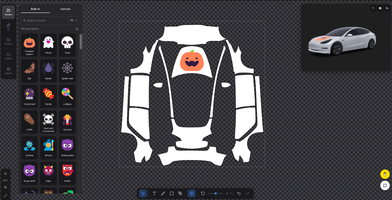
In Tesla Wrap Designer, the Tesla wrap editor lets you select a vehicle template, arrange images, text, and patterns, and examine the composition on a 3D model.
Work through the design in a deliberate order:
- Select the matching model and template version.
- Establish the base color and main contrasting areas.
- Add the principal stripe or number panel.
- Position text and supporting graphics.
- Rotate the preview and inspect the layout before export.
If you use AI generation, describe the composition as well as the style. “Navy racing design with cream side panels and restrained orange accents” gives a clearer direction than “make it sporty.”
AI generation spends credits; manual editing, 3D previewing, and PNG export are free. Examine generated lettering and numbers before keeping them. If the number 27 is unclear, replace it with a clean text element rather than building the design around malformed digits.
Check Seams and Text Direction
The most useful review often happens away from the first flattering angle. Inspect the front, rear, both sides, and the upper surfaces.
Watch where stripes approach door edges and other panel boundaries. A graphic may appear interrupted or change direction unexpectedly after it is mapped onto the vehicle.
Check both sides independently. Text or asymmetric artwork can look correct on one side and reversed on the other, depending on how it has been positioned.
The number panel also needs enough contrast. Cream digits on an orange background might be less readable than navy digits on cream. Test the simplest version first, then add detail only when it remains clear.
Export and Apply the Digital Design
Once the design is settled, download the Paint Shop PNG and retain an unchanged copy. Give revisions distinct filenames so you can identify which version you are testing.
For a compatible setup, upload through the Tesla app under Creations → Wrap → Upload; the app route requires version 4.59.0 or later. Alternatively, place the PNG in a folder named Wraps at the root of a supported USB drive. Select the transferred design in the vehicle under Toybox → Paint Shop → Wraps.
Check the applicable image and filename requirements before transferring the file. Avoid resizing or converting the downloaded PNG unless you are deliberately preparing another compatible export.
With the car parked, examine the number 27, stripe transitions, and lettering on the touchscreen. If a correction is needed, return to the source design and change the affected element before producing another export.
Keep Digital Design Separate From Physical Installation
A digital wrap changes the vehicle representation on screen. It does not change the paint or add vinyl to the actual car.
If you later want a physical version, use the digital concept to explain your preferences to a wrap professional. The installer will need to assess dimensions, production files, material choices, and installation requirements.
Screen previews also cannot establish exactly how printed colors or finishes will look on vinyl. Treat that discussion as a separate stage.
Frequently Asked Questions
How can I make a racing-inspired design without copying a real team?
Create your own palette, number panel, and graphic arrangement. Avoid reproducing a team’s complete livery or using sponsor logos without permission.
What makes a racing number easier to read?
Use simple digits with strong contrast against their background. Leave space around the number and keep stripes from crossing through it.
Should the front and sides use identical graphics?
They should share a visual identity, but their layouts can differ. Repeat selected colors or accents while adapting the composition to each surface.
Finish With a Design That Reads Clearly
A successful racing-inspired digital wrap has a recognizable identity from several angles. Keep the strongest feature clear, check both sides, and confirm the final appearance after import. A restrained palette and a well-placed number often give the design more character than another layer of decoration.
Tesla Wrap Designer is an independent tool and is not affiliated with Tesla, Inc.